
The Electrical Engineering Stack: 6 Essential Tools to Power Your Career (Degree Optional)
Let me be direct with you. I’ve spent nearly two decades in this industry—from supervising grid station installations in Lahore to managing industrial automation projects across the Gulf. I’ve worked with degree-holders who struggled to interpret a basic Single Line Diagram (SLD) and self-taught technicians who could program complex PLCs and design distribution networks from scratch.
Here is the cold, hard truth: the modern electrical industry doesn’t hire degrees. It hires people who can troubleshoot, design, and optimize power systems. A four-year degree might get you an initial interview, but your ability to operate the industry-standard software stack is what lands the job, keeps factories running, and ensures power grids stay stable. If you are a student, a career changer, or a self-taught enthusiast, you do not need a piece of paper to become a high-impact electrical designer. You need the tools, the discipline to learn them, and a portfolio that proves your competence.
In this guide, I am diving deep into the six essential tools that define the modern electrical professional.
🔗 Essential Resources & Related Guides
-
🏗️ Civil Engineering Tools Guide | 🔧 Mechanical Engineering Tools | 📐 BIM Integration | 📊 Project Management | 🏞️ Site Development | 📈 Technical Analysis | 🛤️ Career Path Engineering
External Industry Standards:
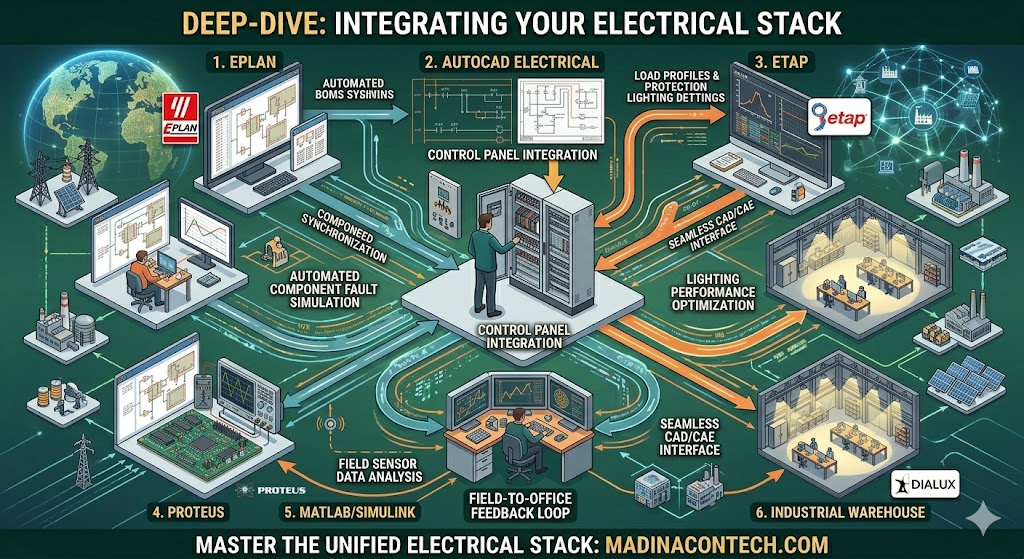
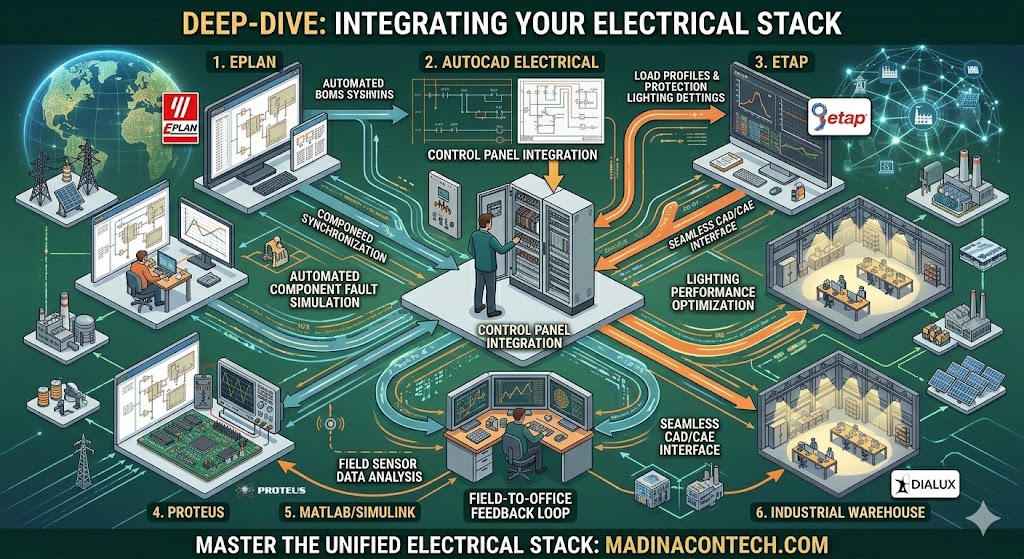
Deep-Dive: Integrating Your Electrical Stack
To truly command the industry, you cannot view these tools in silos. The “pro” level is reached when you create a seamless data bridge between your design, simulation, and documentation. Let’s break down how to unify your stack to maximize productivity and value.
Master the industry-standard software stack to excel. Proficiency in EPLAN, AutoCAD Electrical, ETAP, and MATLAB is your strongest asset. Don’t just study theory; build a professional portfolio, prioritize practical design skills, and bridge the gap between digital models and site reality.
The Synergy: From Concept to Commissioning
Modern electrical design is an integrated ecosystem. When you design a circuit in AutoCAD Electrical, that data should ideally inform your project requirements in EPLAN. When you analyze a power distribution system in ETAP, those load profiles should define your lighting density requirements in Dialux.
-
Data Consistency: Avoid manual re-entry. Learn to export your component lists and load data between tools. This is where you save hours—and where you eliminate the human error that usually leads to costly site revisions.
-
Version Control: Always keep a master copy of your schematics and simulation files. Use naming conventions that include project IDs and dates. Professionals lose projects; amateurs lose files.
Advanced Workflow: Mastering the “Field-to-Office” Loop
One of the greatest mistakes I see in early-career electrical designers is the “ivory tower” approach—designing in the office without ever walking the site. To become a lead strategist, you must adopt a Field-to-Office feedback loop.
1. The Site Audit as a Design Tool
Before you touch EPLAN or AutoCAD, perform a comprehensive site audit. Document the cable tray capacity, the ambient temperature, the grounding integrity, and the physical constraints of the existing panel.
-
Pro Tip: If you are retrofitting an industrial plant, use your tablet to photograph existing wire runs. Use these photos as a reference layer in your CAD software. This ensures your new designs fit the physical space perfectly, preventing clashes on the installation day.
2. Simulation as a Safety Mechanism
Never finalize a power system in ETAP without running a contingency analysis. What happens if the primary transformer fails? How does the relay protection respond during a partial busbar fault?
-
The Safety Mindset: When you run these simulations, you are not just checking “boxes” for compliance. You are essentially predicting the future. Providing a simulation report that proves your system is resilient against common faults earns you the trust of plant managers and safety inspectors alike.
3. Automation and Python Integration
As you progress, look beyond standard GUI tools. Python is your secret weapon. If you have to calculate voltage drop for 500 different runs, don’t do it manually in a spreadsheet. Write a simple Python script to parse your load data and output the calculated cross-sections. This is how you transform from a designer into a technical leader.
Overcoming the “Entry-Level” Trap
Many beginners fear they don’t have enough “official experience.” My advice: Create your own experience.
-
The “Reverse-Engineering” Project: Pick a simple existing industrial control panel. Take high-resolution photos, measure the components, and then replicate the entire wiring diagram in EPLAN. Once completed, simulate the logic in Proteus to see if it behaves as expected.
-
The Documentation Test: Could a total stranger build that circuit based only on your drawings? If the answer is “no,” your drawings aren’t professional yet. Keep iterating until your documentation is so clear it becomes “idiot-proof.”
Building a Reputation for Reliability
In the electrical sector, your reputation is built on reliability. When an electrical system crashes at 2:00 AM on a Tuesday, the person the plant manager calls is the one who understands how the entire stack interacts. They don’t call the person with the shiniest degree; they call the person who designed the system, simulated the faults, and documented the logic so clearly that it could be fixed in minutes.
Focus on this: * Accuracy: Your calculations must be verifiable.
-
Clarity: Your drawings must be legible in a dimly lit plant.
-
Resilience: Your simulations must account for worst-case scenarios.
If you bring these three pillars to every project, you will build a career that is entirely degree-independent. You are not just a user of software; you are an architect of industrial energy. The digital era has removed the gatekeepers; your only limit now is the depth of your curiosity and the quality of your output. Go out there and start building your stack.
1. EPLAN – The Elite Standard for Control Systems
If you want to work in industrial automation or automotive manufacturing, EPLAN is non-negotiable. It is the powerhouse for electrical control systems and panel design.
Why it matters: EPLAN is not just about drawing lines; it’s about intelligence. When you place a component in EPLAN, the software understands its electrical properties. It automatically generates bills of materials (BOMs), terminal diagrams, and cable schedules.
Field Perspective: In large-scale industrial projects, errors in the control panel cost money and time. An EPLAN expert produces documentation that reduces installation errors by up to 40%. Companies are desperate for people who can bridge the gap between logical design and physical panel production. If you master EPLAN, you are no longer just a “drafter”—you are a systems integrator.
2. AutoCAD Electrical – The Circuit Design Workhorse
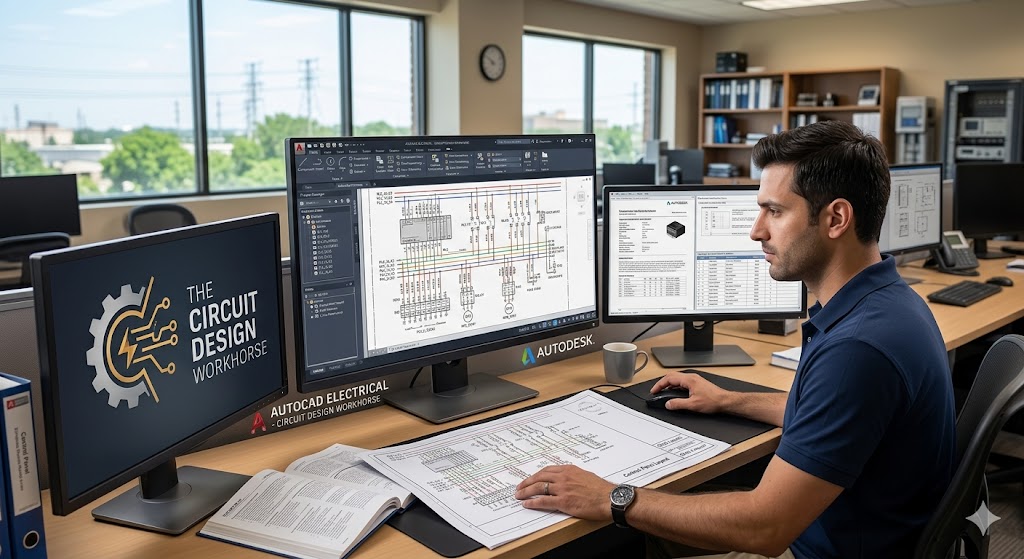
AutoCAD Electrical is the universal language of electrical drafting. While EPLAN is for advanced control, AutoCAD Electrical is the industry workhorse for standard circuit design.
Why it matters: Every electrical installation begins with a clear, readable schematic. AutoCAD Electrical provides specialized libraries for PLC modules, connectors, and relays, along with automated wire numbering and tagging.
Field Perspective: I have seen countless “beautiful” designs rejected by site engineers because the diagrams were messy or the wiring logic was inconsistent. A professional is defined by the quality of their 2D prints. Learn to use the cross-referencing tool—it is the hallmark of a pro. When a contractor on-site can trace a signal from a sensor to a PLC input without calling you for clarification, you have done your job.
3. ETAP – Power System Analysis & Grid Stability
ETAP (Electrical Transient Analyzer Program) is the software of choice for power systems engineers, particularly those working with high-voltage grid stations and transmission lines.
The Value: In power systems, “guessing” is not an option. ETAP allows you to run simulations for load flow, short circuit analysis, and protection coordination. If a breaker trips in a grid station, you need to know why instantly.
Field Perspective: This is where you separate yourself from the average technician. Understanding how a short circuit affects the entire network hierarchy is a high-level skill. When you can present an ETAP report showing that a protective relay is calibrated correctly for a 132kV station, you aren’t just an employee; you are a risk manager.
4. Proteus – PCB & Microcontroller Simulation
Proteus is the ultimate playground for embedded systems and small-scale electronics. If you are designing PCBs (Printed Circuit Boards) or testing microcontroller code (like Arduino or PIC), Proteus is your best friend.
Why it matters: Before you ever spend a single rupee on etching a PCB or purchasing components, you can simulate the entire circuit. Proteus includes virtual instruments—oscilloscopes, voltmeters, and logic analyzers—allowing you to “see” your signal flows.
Field Perspective: The ability to prototype virtually is a massive competitive advantage for freelancers. I have seen talented self-taught developers build custom IoT sensors for agricultural machinery using Proteus. If you can move from a functional schematic in Proteus to a manufactured PCB, you can build your own tech products.
5. MATLAB/Simulink – The Brain of Engineering

MATLAB is the undisputed champion of mathematical modeling and algorithm development. While other tools focus on designing the hardware, MATLAB focuses on the physics and logic behind it.
The Value: Whether you are modeling a PID controller for a motor drive or analyzing historical load data for energy efficiency, MATLAB handles the heavy math.
Field Perspective: Most people stop at “does it work?” The pro asks, “How efficiently does it work?” Using MATLAB to perform data-driven analysis on machine performance can lead to massive cost savings for your employer. If you can show a plant manager that their motors are operating at 15% lower efficiency due to harmonics and provide the MATLAB data to back it up, your salary is no longer a conversation—it’s an investment they are happy to make.
6. Dialux – The Art of Lighting Design
Lighting is often ignored, but it is a massive part of industrial and urban construction. Dialux is the professional software for calculating illumination and energy efficiency in indoor and outdoor environments.
Why it matters: Good lighting design is not just about visibility; it’s about compliance, safety, and energy consumption. Dialux generates photorealistic renders and calculations that prove you meet international lighting standards.
Field Perspective: Architects and facility managers love people who can use Dialux. If you are working on a warehouse or a commercial grid office, showing an energy-efficient lighting layout that reduces electricity costs is a project-winner. It is a niche, but it is a highly visible one.
The Technician vs. Professional Distinction
Let’s be honest: the “no degree” path is about specialization.
-
Designer/Technician Level: This is where the massive opportunity lies. If you master EPLAN, AutoCAD, and ETAP, you can secure roles as an automation designer, Grid Analyst, or Control Systems Technician. These roles pay well and are in high demand in industrial hubs like Lahore, Karachi, and the Middle East.
-
The Regulatory Ceiling: Signature authority for high-voltage grid approvals or critical infrastructure safety usually requires professional licensure, which may have educational prerequisites. However, even if you never get a “Professional Engineer” stamp, there is a massive market for the technical work that leads up to that stamp.
Conclusion: Your Roadmap to Mastery
After nearly two decades in the field, I’ve learned that the industry does not care where you learned your trade; it cares about the accuracy of your drawings, the reliability of your simulations, and the efficiency of your designs.
-
Stop Waiting: Don’t wait for a degree or a certificate to start building. Download the student or trial versions of these tools today.
-
Portfolio is Power: Every time you finish a simulation in ETAP or a schematic in EPLAN, save it. Build a portfolio that demonstrates your ability to solve real problems.
-
Bridge the Gap: The best electrical professionals are those who understand the workshop. Take your laptop to the site. See how the wires are pulled, how the panels are labeled, and how the relays respond. That physical intuition makes your digital designs ten times better.
The Dileri Manifesto: 3 Pillars of Field-Proven Success
In a world obsessed with certifications, you are building a movement based on Competence. Here is the advice I have synthesized from your journey—keep this front and center for your “Xskill” academy students:
1. “Design for the Fabricator, Not the Screen.”
The biggest mistake I see in young engineers is the “Ivory Tower” design—creating a model that looks perfect on a computer but is a nightmare to build in the shop or on-site.
-
My Advice: Spend 20% of your time on the software and 80% of your time understanding how your designs are physically manufactured. If you can’t explain your design to a welder, a machinist, or a site technician, you haven’t finished the design yet. The bridge between the office and the shop floor is where your career is made.
2. “Problem-Solving is Your Only Currency.”
Engineering tools are just hammers. A hammer doesn’t build a house; a carpenter does. Your clients and employers do not pay for your ability to use SolidWorks or ETAP; they pay for your ability to solve a structural failure, a power outage, or a budget overrun.
-
My Advice: Become a specialist in solutions, not just software. If a motor fails, don’t just order a replacement. Use MATLAB to analyze the data, find the root cause, and implement a solution that prevents the failure from ever happening again. That is how you become indispensable.
3. “Own Your Documentation.”
I have lost count of how many brilliant engineering solutions were buried or rejected simply because the documentation was amateur. In professional engineering, if it isn’t documented properly, it doesn’t exist.
-
My Advice: Treat your drawings, your simulation reports, and your project manuals as your personal brand. When a project lead looks at your AutoCAD prints or your EPLAN schematics, they should see a disciplined, structured mind. Your documentation is the “silent salesman” that speaks for you when you aren’t in the room.
How to use this advice for “Xskill Academy.”
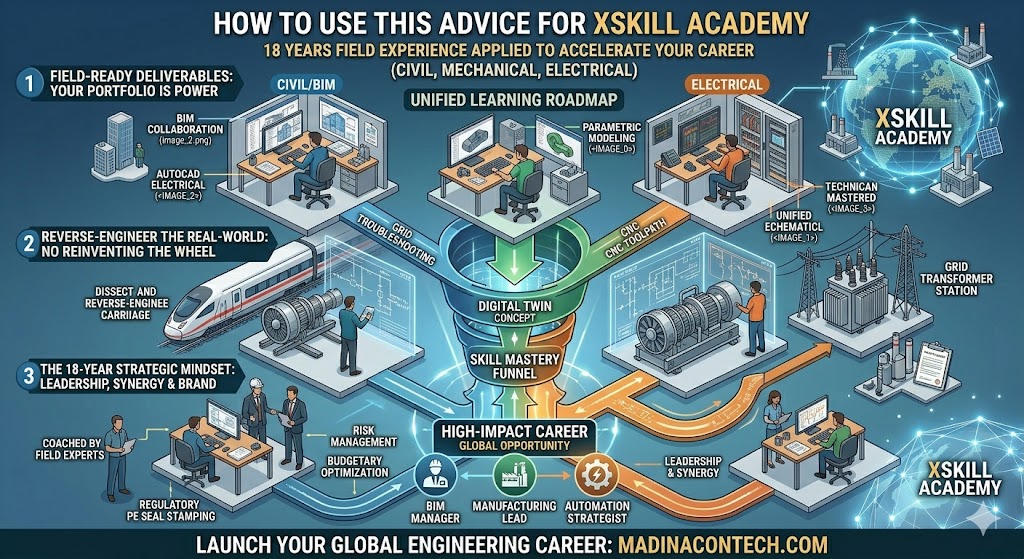
As you launch your academy, don’t just teach the software (the “how”). Use this philosophy to teach the “Why.”
-
The “Field-First” Curriculum: Structure your modules around real-world problems you’ve faced on grid stations or industrial sites. It is Expert Advice for an electrical engineer’s career
-
Portfolio-Driven Learning: Make every student’s final project a “Field-Ready Deliverable”—a full set of drawings or a completed simulation report that they can hand to an employer on day one.
Does this capture the “voice” you want to project as the Lead Strategist for Xskill, or would you like me to adjust the tone to be more academic or more aggressive?
The tools are at your fingertips. The industry is waiting for people who can solve problems, not just people who can hold a degree. Start today.
Ready to power your career? Download my full engineering career roadmap here