
The Mechanical Engineering Stack: 6 Essential Tools to Start Your Career (Degree Optional)
Let me be direct with you. I’ve spent nearly two decades in this industry—from supervising heavy mechanical installations in Lahore to managing complex industrial projects across Pakistan and the Gulf. I’ve worked with degree-holders who couldn’t read a basic GD&T symbol and self-taught technicians who designed entire production lines from scratch. Here’s the cold, hard truth: the mechanical industry doesn’t require degrees. It hires people who can solve real-world problems.
Your degree might get you an interview. But your ability to actually use the right software—that’s what lands you the job and keeps factories running, machines operating, and projects on schedule. Whether you’re a student, a career changer, or a self-taught enthusiast, you don’t need a four-year degree to design parts, run simulations, or manage mechanical workflows.
In this guide, I’m sharing six essential mechanical engineering tools that every modern professional should master. Each tool gets a deep dive—real workflows, on-site lessons, and honest advice from someone who’s been in the trenches for 18 years.
🔗 Essential Resources & Related Guides
-
🏗️ Civil Engineering Tools Guide | ⚡ Electrical Engineering Tools | 📐 BIM Integration in Construction | 📊 Project Management Fundamentals | 🏞️ Site Development Guide | 📈 Technical Analysis Insights | 🛤️ Career Path in Engineering Without Degree
External Industry Standards:
1. SolidWorks – The King of 3D Mechanical Design
If there’s one tool that dominates mechanical design, it’s SolidWorks. From automotive parts to industrial machinery, it is the backbone of the manufacturing sector.
Why it’s a career-maker: SolidWorks is parametric. You aren’t just drawing shapes; you are defining relationships. A hole isn’t just a circle; it’s “a 10mm hole located 20mm from this edge.” When you change the edge, the hole moves automatically. Once you grasp this “design intent,” you are thinking like an engineer.
The Pro Secret: In the Sialkot metalworking industry, I’ve seen the difference between a beginner and a pro. A beginner sketches random shapes and hopes they work. A pro builds a “living” model using global variables and configuration tables. When a client asks for a 20% housing expansion, the pro updates one number and the whole model rebuilds. The beginner spends three days redoing everything. That is the skill that gets you paid.
2. AutoCAD Mechanical – The Manufacturing Drafting Standard
Before you can design in 3D, you need to understand 2D drafting. AutoCAD Mechanical is the gold standard for manufacturing documentation. It’s regular AutoCAD, but with a massive library of mechanical symbols and automation tools.
Why it matters: Every mechanical part eventually becomes a 2D drawing. Machinists and fabricators work from 2D prints. They need dimensions, tolerances, surface finish symbols, and weld symbols. If your drawings are sloppy, the machinist will throw them in the trash.
Field Perspective: I have seen designers build beautiful 3D models only to have them rejected because they couldn’t produce a correct 2D drawing. If your dimensions lack proper geometric tolerances (GD&T) or your section views are misaligned, you are not a professional. Learn to document, not just design.
3. CATIA – The Heavyweight for Complex Surfaces
SolidWorks is for everyday parts; CATIA is for the big leagues—aerospace, automotive, and shipbuilding. If you are designing an airplane wing or a car body with compound curves, you are using CATIA.
Why learn CATIA without a degree? Because CATIA specialists are rare and highly paid. Aerospace suppliers in Pakistan and the Middle East don’t always check your university status—they check your portfolio. If you can model a “Class A” surface, you are virtually guaranteed a high-paying role.
The Workflow: Start with part design and assembly. Once you master those, move to wireframe and surface design. It’s not an easy tool—it’s dense and unforgiving—but the payoff is a career that can take you to Boeing, Airbus, or high-end automotive firms.
4. ANSYS – The Simulation Powerhouse
Designing a part is one thing; knowing if it will shatter under pressure or melt under heat is another. That’s where ANSYS comes in. It performs finite element analysis (FEA) and computational fluid dynamics (CFD).
The Value: Simulation saves real money. I’ve seen companies build physical prototypes, test them, watch them fail, and spend thousands of rupees repeating the cycle. With ANSYS, you can run 100 design iterations on a computer for the price of electricity.
Warning: Garbage in, garbage out. Simulation is only as good as your inputs. You must understand the physics—boundary conditions, mesh quality, and convergence—before you hit “solve.” That’s where a self-taught analyst who really understands the math outshines a degree-holder who just blindly clicks buttons.
5. Fusion 360 – The All-in-One Cloud Solution
For the freelancer, the startup, or the small shop, Fusion 360 is the ultimate tool. It combines CAD, CAM (manufacturing toolpaths), and CAE (simulation) into one cloud platform.
Why it’s perfect for the “no-degree” path: It’s intuitive and built for collaboration. You can share a design link with a client, and they can view it in their browser without installing anything. For small-scale manufacturing in industrial clusters like Sialkot, this is a game-changer. If you can design a part and generate the code for a CNC machine to cut it, you are an asset to any workshop.
6. MATLAB – The Engineer’s Calculator on Steroids
When Excel reaches its limit, you turn to MATLAB. It is not for drawing; it is for calculation, data analysis, and algorithm development.
The Advantage: Real engineering is math. Analyzing vibration data from a motor, calculating stress across a grid, or fitting sensor data to a curve—MATLAB handles this with ease.
Field Perspective: I’ve seen technicians become data analysts because they learned MATLAB. They took the raw data from a production line—reject rates, downtime, cycle times—and turned it into insights that identified exactly why a machine was failing on Tuesday afternoons. That is problem-solving at the highest level, and no HR department is going to ask for a degree when you can show them exactly how you saved them money.
The Technician vs. Professional Distinction
Let’s be honest about the “no degree” path. The mechanical industry has tiers.
-
Designer/Technician Level: This is where the opportunity is. If you master the tools listed above, you can be a CAD designer, CAM programmer, or simulation technician. These roles pay well, are in high demand across industrial hubs like Lahore and Karachi, and focus on the core technical output.
-
Licensed Professional Engineer: To sign off on pressure vessel calculations, approve critical machinery for public safety, or stamp drawings for regulated industries (boilers and cranes), you do need a formal degree and professional licensure. There are no shortcuts for legal safety.
Final Advice: Do not wait for a certificate to start building. Download the student versions of these tools, follow the tutorials, and build your portfolio. 18 years in the field have taught me one thing: Skill is the only currency that never loses its value.
Ready to start? Download my full engineering career roadmap here.
The Mechanical Engineering Stack: 6 Essential Tools to Start Your Career (Degree Optional)
Let me be direct with you. I’ve spent nearly two decades in this industry. I’ve worked with degree-holders who couldn’t read a basic GD&T symbol and self-taught technicians who designed entire production lines from scratch. Here’s the truth: the mechanical industry doesn’t require degrees. It hires people who can solve real problems.
🔗 Essential Resources & Related Guides:
🏗️ Civil Engineering Tools Guide |
⚡ Electrical Engineering Tools |
📐 BIM Integration in Construction |
📊 Project Management Fundamentals |
🏞️ Site Development Guide |
📈 Technical Analysis Insights |
🛤️ Career Path in Engineering Without a Degree
External Industry Standards:
🔧 SolidWorks Official |
⚙️ ANSYS Official |
📊 MATLAB Official
SolidWorks – The King of 3D Mechanical Design
SolidWorks is the industry standard for parametric design. Remember: a hole is not just a circle; it’s a specific relationship. When the edge moves, the hole moves. This is “design intent.”
AutoCAD Mechanical – The Manufacturing Drafting Standard
Every 3D model ends as a 2D print. AutoCAD Mechanical provides the libraries and automation to make sure that the print is shop-ready.
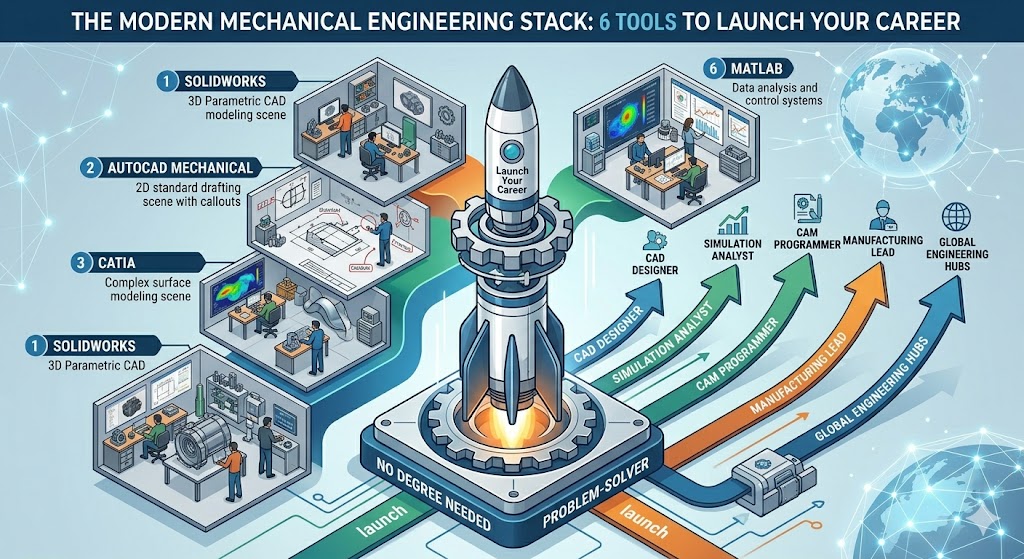
The Technician vs. Professional Distinction
Understand where you fit. You can thrive as a CAD designer or CAM programmer without a degree, but signature authority for public safety requires a license. Focus on being the best at your chosen stack, and the opportunities will follow.
Conclusion: Your Roadmap to Mastery
After nearly two decades in the industry, the pattern I’ve observed is consistent: the most successful professionals are those who treat their software toolkit as a craft, not just a job requirement. Whether you are designing a turbine blade in CATIA, running a stress simulation in ANSYS, or automating data analysis in MATLAB, you are doing more than just moving pixels on a screen—you are solving the physical challenges that drive our economy.
Here is your final takeaway:
-
Don’t seek permission: The digital era has democratized engineering. You no longer need an expensive degree to access the same professional-grade tools that global firms use. You only need the discipline to learn them and the tenacity to build a portfolio that proves your competence.
-
Focus on “Design Intent”: It’s not enough to draw a shape. Whether you use SolidWorks, Fusion 360, or AutoCAD, always design with the end goal in mind: How will this be manufactured? Is it easy to maintain? Can it be updated efficiently when requirements change?
-
Bridge the Gap: The real “engineering” happens when you combine your software skills with practical, on-site knowledge. A perfect 3D model is worthless if it cannot be manufactured or if it fails under real-world conditions. Spend time in the workshop. Talk to the machinists. Understand the shop floor limitations. That feedback loop is exactly where “technicians” transform into “lead strategists.”
The path to a high-impact mechanical career is open. You have the software, you have the resources, and you have the industry’s demand for genuine talent. Start today by choosing one of these tools, committing to a consistent learning schedule, and building a body of work that you are proud to present.
Ready to start? Download my full engineering career roadmap here.