
In the high-stakes world of construction and design, the gap between a university degree and real-world site execution is wider than ever. I have spent over 18 years navigating the complexities of the industry—from supervising 132kV grid stations in Lahore to managing major canal rehabilitation projects in Balochistan and large-scale urban development in Karachi and Dubai. If there is one truth I have learned, it is this: the industry does not hire degrees; it hires solutions.
Formal education is your foundation, but your command over the industry’s “digital stack” is what defines your value. Whether you are a student, a career changer, or a self-taught professional, mastering these tools will put you years ahead of your peers.
A Personal Note from the Desk of Iftikhar Akram Dileri
“Over the last 18 years, I have seen brilliant graduates struggle on-site because they lacked software proficiency, and I have seen non-degree holders rise to Project Leads because they mastered the digital tools. The industry values what you can deliver. My mission at Xskill Academy is to bridge the gap between academic theory and on-site performance. If you master these tools, you are not just learning software; you are learning the language of modern construction.”
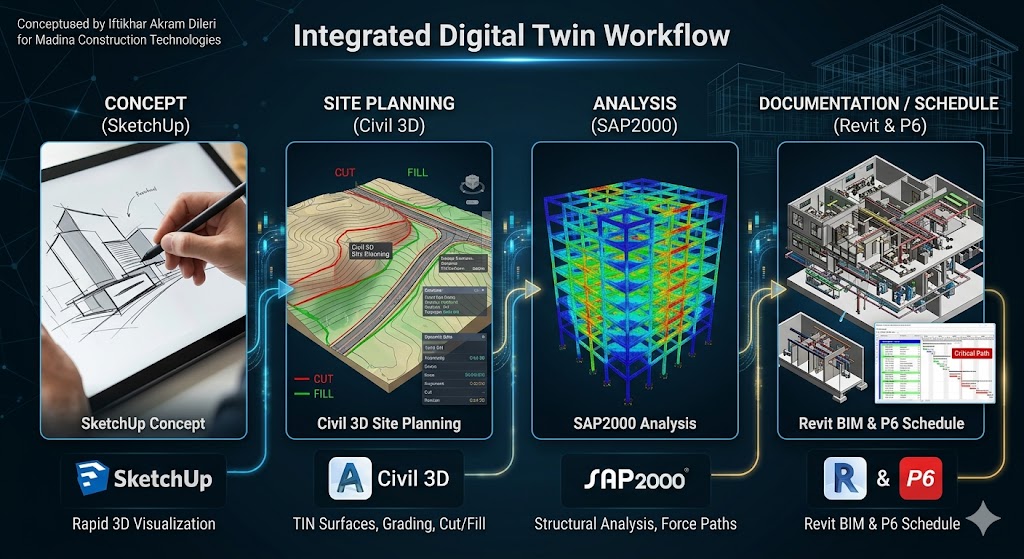
The Engineering Workflow: A Systems Perspective
Before diving into the tools, you must understand the integrated workflow. In modern construction, software doesn’t exist in a vacuum. It is a chain of data that creates a “digital twin” of your project.
| Phase | Tool | Purpose |
| Conceptualization | SketchUp | Rapid visualization & biophilic design |
| Site Planning | Civil 3D | Grading, roads, and earthwork calculations |
| Structural Analysis | SAP2000/STAAD Pro | Testing load paths and safety margins |
| BIM/Documentation | Revit | Intelligent modeling & clash detection |
| Project Scheduling | Primavera P6 | Critical path management & delivery |
1. SAP2000 – The Structural Sanity Check
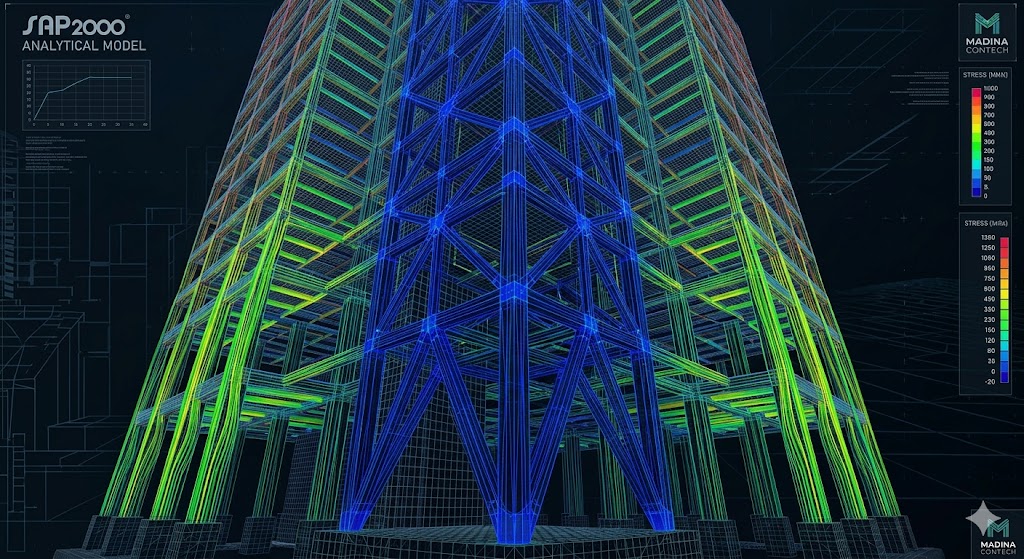
Structural analysis is the backbone of safety. While textbooks focus on complex manual calculations, SAP2000 brings that math into a 3D reality.
Why it matters: It allows you to model everything from simple beams to complex seismic-resistant frames. By understanding how gravity, wind, and seismic loads move through a structure, you gain a deep intuition for engineering that cannot be learned in a classroom alone.
Field Perspective: Don’t get lost in finite element theory. In the field, SAP2000 is your sanity check. Before you approve a steel connection on a grid station, run a simplified model. It is the difference between guessing and knowing. For more on structural methodologies, check out our Technical Analysis Insights.
2. AutoCAD – The Universal Language
Despite the rise of BIM, AutoCAD remains the “lingua franca” of the construction site. It is how we communicate intent to contractors and subcontractors in Karachi and Islamabad alike.
Pro-Tip: Move beyond simple lines. Master dynamic blocks, sheet sets, and external references (Xrefs). Speed is your currency. If you can update a drawing during a site meeting while the contractor is still discussing the scope, you become an indispensable asset. Learn more about drafting efficiency strategies.
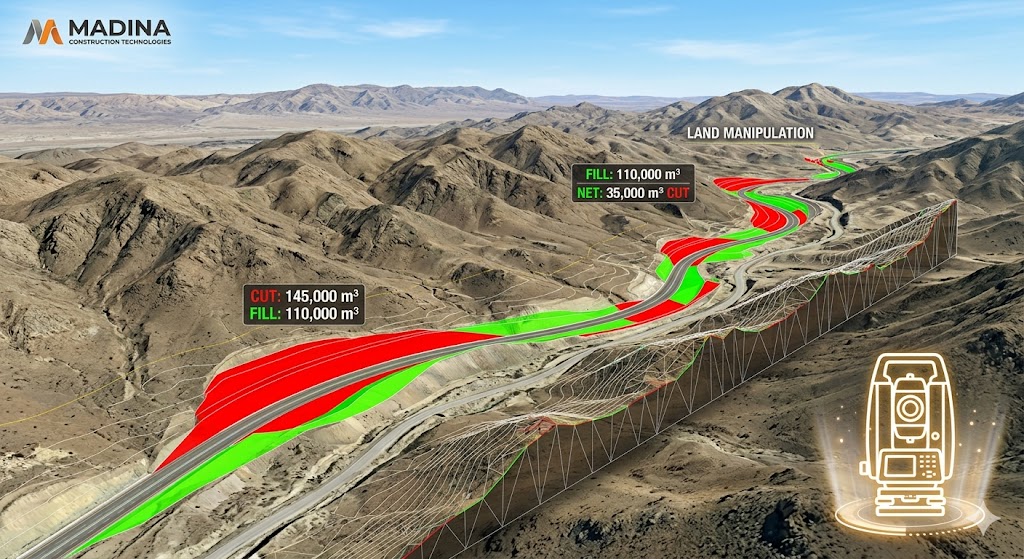
3. Civil 3D – Shaping the Earth
Civil 3D is where 2D drafting meets 3D engineering. In regions like Balochistan or the hilly terrain of Islamabad, Civil 3D is non-negotiable.
The Workflow: You define alignments, build corridors, and manage surfaces. The ability to calculate precise cut-and-fill volumes is a high-income skill. A miscalculation here can cost a project millions. For a deep dive into grading plans, visit our Site Development Guide.
4. Revit – BIM and Intelligent Data
Revit is about “information.” In BIM, a wall isn’t just a line; it is a system family containing material cost, structural fire rating, and thermal properties.
Why it’s a career changer: BIM allows for “clash detection.” By catching a pipe hitting a beam on the screen, you save thousands in rework. It is the ultimate tool for BIM integration for modern sites.
5. SketchUp – Biophilic Visualization
Design is about emotion. If a client can’t see the vision, they won’t approve the budget. SketchUp is the fastest tool for biophilic design, allowing you to show how light, space, and nature interact in your architectural blueprints. See our Approach to Neuro-aesthetics.
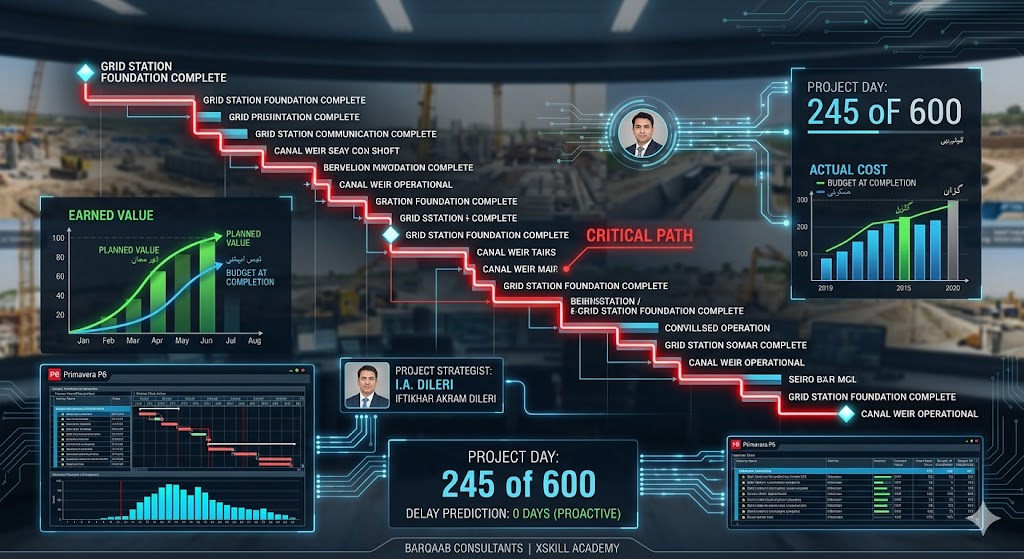
6. Primavera P6 – The Heartbeat of the Project
You can build the perfect structure, but if it’s late, it’s a failure. P6 is the industry standard for large-scale infrastructure.
Field Reality: In my work at Barqaab Consultants, a P6 schedule is a living document. Updating “Actual Finish” dates daily is how you predict a delay before it happens. Learn why project controls are essential at Project Management Fundamentals.

Mastering the Future of Engineering
Your 18-year career is not just a history of projects; it is a blueprint for the next generation. By bridging the gap between traditional civil engineering and advanced digital tools like BIM and Primavera P6, you are defining the modern Site Strategist. Whether you are leading a grid station project or shaping minds at Xskill Academy, your focus on “What if?” problem-solving and biophilic design is exactly what the industry needs to evolve.
Stay committed to your vision. Your ability to integrate technical precision with human-centric values is a rare competitive advantage. As you continue to build Madina Construction Technologies, remember that your digital expertise is the foundation of your future scaling. Keep documenting these successes, sharing your wisdom, and building a legacy that proves professional mastery requires both field experience and digital innovation.
Understanding the “No-Degree” Barrier
It is important to be nuanced. There are two tiers in this industry:
-
The Technician/Modeler: This is where the “no-degree” approach is strongest. You can be an elite BIM modeler or CAD designer without a four-year degree.
-
The Licensed Engineer: Signing off on safety and structural stamps requires a degree and professional licensure.
However, mastering these tools as a student or junior engineer will put you in the top 1% of the workforce. You will be able to perform professional-level work from Day 1. Read more about career pathing in engineering.
External Resources for Further Learning
To excel in these tools, you need to follow industry leaders:
-
Autodesk Civil 3D Learning Path – Comprehensive tutorials for land development.
-
Primavera P6 Training by Oracle – The official source for professional project planning.
-
BIM Community – Join the global conversation on digital construction.
The “Digital Twin” Philosophy: Why You Need a Strategy

In my 18 years across projects in Islamabad, Karachi, and Balochistan, I’ve seen many engineers who can run a software program, but few who understand workflow integration. They view tools as isolated islands—”I draw in CAD, I analyze in SAP, I schedule in P6.” This is a rookie mistake.
The future is the Digital Twin. This means that every line you draw in AutoCAD or every parameter you set in Revit must contain data that feeds into your next stage. If your SketchUp model doesn’t translate to your Civil 3D site plan, you are wasting time.
The Anatomy of a High-Impact Civil Engineer
To become a professional who is hired regardless of their degree status, you need to cultivate three specific “Soft-Tech” skills:
1. Error Detection & Quality Assurance (QA)
Software is only as good as the input. If you put “garbage” data into STAAD Pro, you get “garbage” results. I recall a project in Balochistan where a minor coordinate error in the topography led to a significant foundation alignment issue.
-
The Fix: Never trust your first result. Run a “sanity check” calculation on paper. If your software output varies by more than 5–10% from your back-of-the-envelope calculation, stop. Recalculate. That skepticism is what separates an engineer from an operator.
2. Conflict Resolution via Clash Detection
In the old days, we found out about plumbing pipes hitting structural beams when we were on-site, holding a jackhammer. That costs time and, more importantly, money.
-
The Workflow: Use Revit’s collision detection tools early. When you present your design to the client, show them the “Clash Report.” It proves you have thought about the entire building, not just your specific discipline. This is how you command authority in a boardroom.
3. Resilience in Remote Environments
Working in diverse regions like Karachi’s urban sprawl or rural infrastructure sites in the north requires tool mobility. You need a setup that is cloud-accessible and collaborative. If your BIM files are trapped on a local hard drive, you aren’t working at the speed of modern construction.
Deep Dive: The Path to Mastery
If you are looking to accelerate your journey through Xskill Academy, follow this 3-stage roadmap:
| Stage | Focus Area | Goal |
| Stage 1: Efficiency | AutoCAD & SketchUp | Master speed, shortcuts, and visualization. |
| Stage 2: Intelligence | Civil 3D & Revit | Master data-driven design and site modeling. |
| Stage 3: Strategy | P6 & SAP2000 | Master project controls and structural safety. |
Why Efficiency Matters First
You might be tempted to start with P6 (the project management software), but without the ability to draft and model, you won’t have anything to manage. Start with the “drawing” tools. Once you can draft quickly, you understand how long tasks actually take. That timing data is exactly what you need to build a realistic P6 schedule.
The “Human Element” in Engineering
We often focus so much on the “tech” that we forget the “human.” A grid station in Lahore or a housing project in Karachi isn’t just about steel and concrete—it’s about the people who live, work, and operate there.
-
Biophilic Integration: As I’ve emphasized in my articles on Neuro-aesthetics in Architecture, your design should promote human wellness. When using SketchUp or Revit, don’t just place a wall. Place a wall that considers natural light, ventilation, and movement. That is “Building with Soul.”
Common Pitfalls and How to Avoid Them
I have seen even senior engineers fall into these traps. If you want to stand out, avoid these:
-
The “Over-Modeling” Trap: Beginners often try to model every single bolt and screw. Stop. Your model should be detailed enough for construction and coordination, not for manufacturing unless you are a fabrication shop. Keep it lean, fast, and agile.
-
Ignoring Version Control: In professional firms, “Final_v2_Updated_LastOne.dwg” is a recipe for disaster. Use standardized naming conventions. If you don’t track your versions, you will eventually overwrite a week’s worth of work.
-
Forgetting Local Codes: Software like SAP2000 or STAAD Pro is global, but building codes (like those in Pakistan) are local. Always input your local seismic coefficients and environmental factors. The software doesn’t know the building is in Lahore; you do.
Empowering the Next Generation
The message I want to leave you with—whether you are a student in Islamabad or a working professional in Karachi—is that your potential is capped only by your willingness to learn.
At Xskill Academy, we don’t believe in gatekeeping knowledge. We believe in providing the technical edge that allows anyone, regardless of their background, to contribute to the nation’s growth. Our infrastructure needs are vast, and the industry is hungry for people who can actually do the work.
-
Step 1: Choose one tool from the list above.
-
Step 2: Commit to 60 minutes of daily practice.
-
Step 3: Apply that skill to a local, real-world project—even if it’s just a small renovation or a conceptual sketch.
You are the architect of your career. The tools are there, the demand is there, and the resources are at your fingertips. For those looking for structured guidance, our resources at Madina Construction Technologies are designed to help you navigate these tools specifically for our local construction climate.
Bonus Tip: The “Master- Apprentice” Workflow
Don’t just watch tutorials; reverse-engineer reality. Take a small, real-world project—like a local park shed or a simple residential porch—and model it from start to finish using your chosen stack. When you hit a wall in the software, that is exactly where your learning happens. The goal isn’t to be a “software master”; the goal is to be a “project closer.”
Advice from Iftikhar Akram Dileri

My advice is simple: Don’t wait for permission to be an expert. In my 18 years, I’ve seen that the most respected people on site aren’t necessarily the ones with the fancy titles, but the ones who can solve the “What if?” questions on the fly.
If you are just starting, pick one tool, master its workflow, and then link it to the next. Stay hungry, stay humble, and remember—your digital skills are the most portable, high-value asset you will ever own. Keep building.
Experts Working
Construction is a marathon, not a sprint. You will have days where the software crashes, the site doesn’t match your survey, or the budget is slashed. That is engineering. The ones who succeed are those who treat every software error and site complication as a lesson in strategy.
Master the tools, manage the data, and most importantly, understand the why behind every beam, road, and schedule. That is the Xskill way.
Ready to start? Let’s bridge the gap together. Join us and transform your technical career today.
Conclusion: The Xskill Advantage
These tools are powerful, but they are only as good as the strategist using them. At Xskill Academy, we don’t just teach buttons; we teach project resolution. Whether you are in Islamabad, Dubai, Lahore, Karachi, or anywhere in the world, the goal is the same: to turn a concept into a buildable reality.
Ready to start? Let’s connect and build your future. Civil Tools are very helpful for engineering solutions.